Periodization and adaptation,
done by the plan
Most fitness apps create isolated workouts. phase.fitness is an AI workout plan generator that writes a complete, science-based training program — phased progression, automatic workload adjustments and recovery management — and then rebuilds it from the sessions you actually did.
Start Your ProgramBuilt on proven training science
Periodization and adaptation are the cornerstones of modern exercise science, and phase.fitness applies them to your program automatically. Right now, phase.fitness is the only training app that writes strength, cardio and calisthenics into one periodized program — same calendar, same phases, same recovery budget.
Periodization
Your training is organized into strategic phases — base building, intensification, peak, and recovery. Each phase has a specific purpose: building volume first, then shifting to intensity, then sharpening for performance.
This is how Olympic athletes and professional coaches structure training. phase.fitness brings this methodology to everyone.
Adaptation
Your program isn't static. When a phase ends, the AI reads what you actually did — your effort, what you completed, what you skipped — and writes the next phase from it.
Within a phase, every strength exercise progresses on its own, first reps and then load, and a planned deload week eases off for you. No guesswork.
Intelligent workout creation
A training plan generator that starts from your goal, your equipment and your constraints — and from the training-science documents the generator is allowed to read.
Goal-Driven
Preparing for a marathon? Building strength? Losing weight? The AI designs complete programs around your specific objective and timeline.
Equipment-Aware
Only have dumbbells? Bodyweight only? Full gym? The AI generates workouts using only the equipment you have available.
Mixed Programs
Strength, cardio and calisthenics days in the same weeks, laid out so the hardest days don't land back to back — whichever modality they belong to.
Athlete Profile
Connect Intervals.icu, Hevy or Liftosaur — or Garmin, if you let the AI use your activities — and the AI writes a profile from your history: sport, training frequency, estimated maxes, cardio metrics. Free, and it rewrites itself as new sessions come in.
Smarter Context
Every time the AI writes or changes a routine it reads the same context: your profile, the maxes you confirmed, your goal, the program's notebook, what you logged, and what it remembers from past programs.
Constraint System
Exclude specific exercises, target certain muscle groups, or set equipment constraints per-routine. Regenerate individual routines without touching the rest of your program.
Get started in a few taps
The first time you sign in, a short setup asks one thing at a time and gives the AI what it needs to build a good first program. Almost every question can be skipped, and you can run it again under More → Onboarding.
- 1
Connect
Garmin gets the workouts you plan here and brings back the ones you finish. Intervals.icu, Hevy and Liftosaur give the AI your real history instead of a guess, and Garmin can too if you allow it. Strava gets the sessions you choose to post. Every one of them is optional.
- 2
About you
Your name, how long you've trained, how you like to train and how competitive you are, then age, sex, height and weight. Some of it is filled in from the apps you connected.
- 3
Your maxes
The one-rep maxes you know, so your first weights aren't a guess. Skip any you don't.
- 4
Program
Your first program: a goal in your own words, the days you can train and your equipment.
Open the app, start the session
Today is where phase.fitness opens: the session you're training, where you are in the phase, and how ready you are for it. Press Start and the player takes you through it one set at a time — on a phone at the rack, or a laptop at home.
Today's session
phase.fitness and week, exercises, estimated minutes and RPE — or the next one up on a rest day.
Readiness
Form, fitness and fatigue from your connected apps.
Log as you go
Kilos and reps, metres or hold time. The weight you just used carries over to the next set.
Rest timer
A sound when rest ends, and the screen stays awake between sets.
How to perform
A preview of the movement and how to do it — written by hand for the fundamental lifts.
Nothing lost
Sets stay on the device until they're saved, so a dropped signal doesn't cost you the workout.
Programs, organized
Five tabs, from the calendar you train from to the notebook the AI reads before it changes anything.
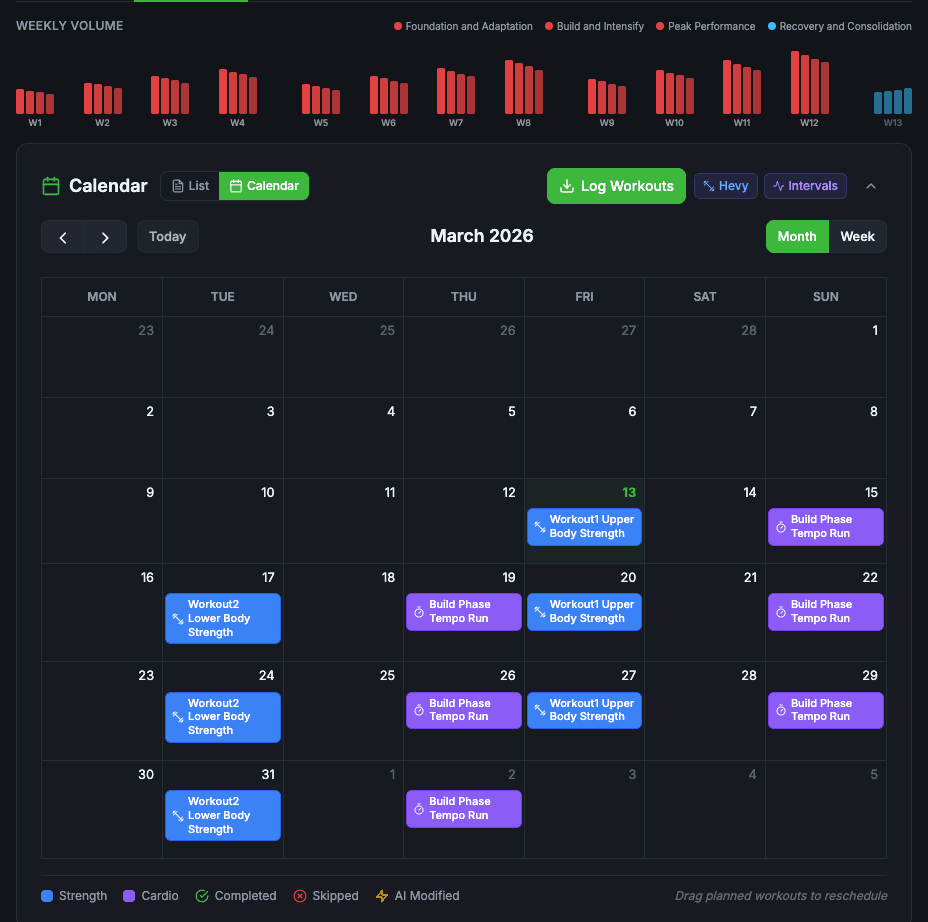
Calendar
Weekly volume and the calendar: where you log, move and skip sessions.
Phases
Every phase and its routines: where you edit, refine and regenerate.
Insights
The analysis of each finished phase, and what it recommends for the next.
Overview
The goal and its milestones, the key numbers, and the reasoning behind the plan.
Notebook
The program's rules and what it has learned so far.
See your workload at a glance
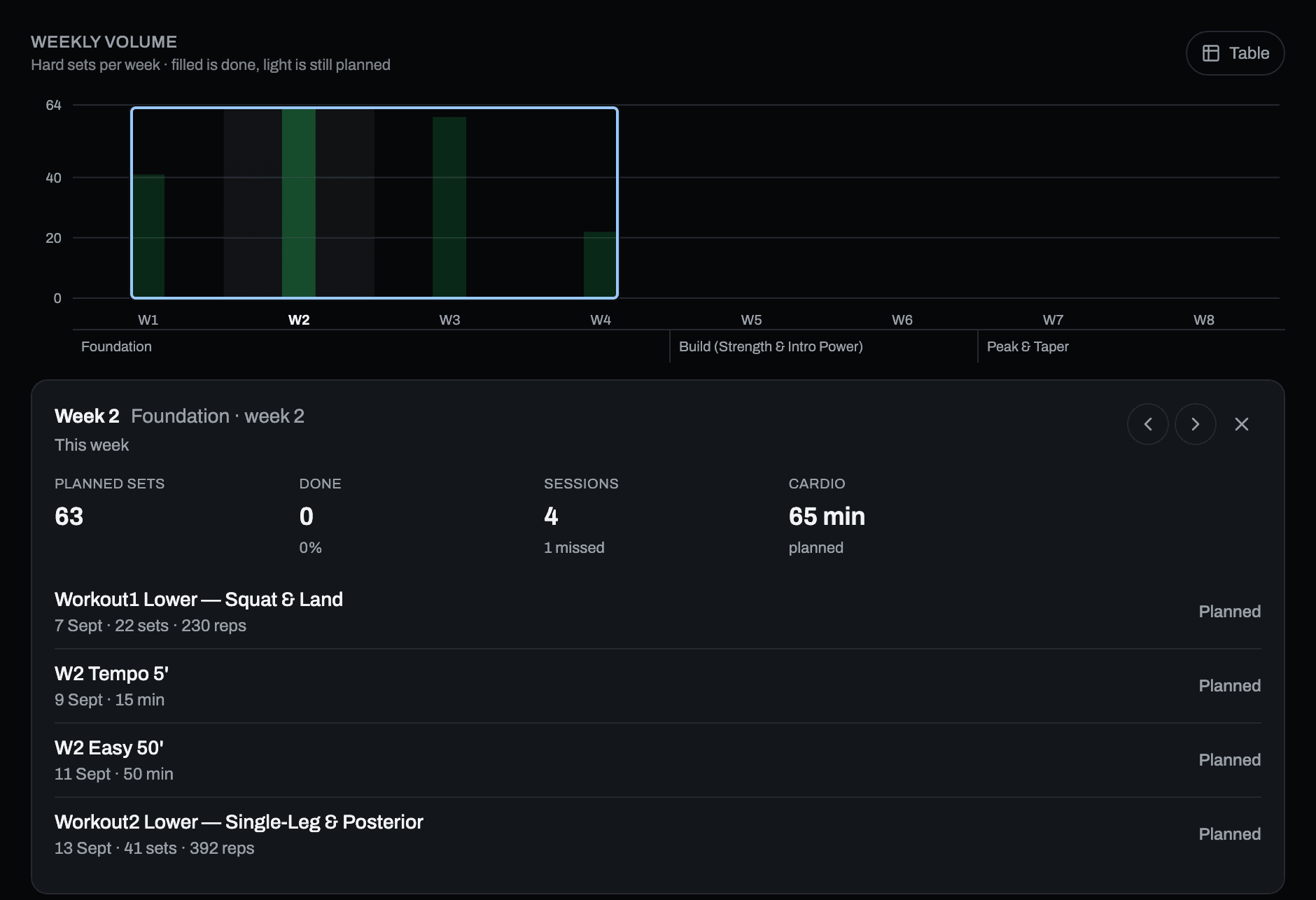
One bar per week, and its height is the hard sets you actually have planned — read from the progression schedule of every exercise, not from an estimate. Warm-up sets are not counted.
- Filled is done, light is still planned — the bar fills as you log
- Deload weeks are shorter, and marked, because the phase declares them
- phase.fitness bands under the axis show where one block ends and the next starts
- Tap a week for its sessions: sets done, sessions skipped, cardio minutes
- A table view for the same numbers, when you would rather read than scan
Everything your data can tell you
Five tabs, fed by the apps you connect and the sessions you log: how the program is going, how you are recovering, and what you actually did.
- Insights
- Your program's status, how much of the plan you complete, your fitness curve and training load, and the alerts along the way.
- Wellness
- HRV, sleep and recovery over time.
- Activities
- Everything you did, from every app, in one feed — heart rate, sport breakdown, calories. Open one for its zones, laps and intervals.
- Strength
- Your estimated 1RMs and which way each is moving, sets per muscle group, weekly volume, how hard your sets were, and your personal records — from the workouts you log in Hevy.
- Log
- Your sessions, one after the other.
The third modality, in the same program
Muscle-up, front lever, planche, handstand, human flag. Not a separate app and not a YouTube playlist — skill days sit on the same calendar as your barbell and cardio days, and count in the same week.
Placed, not started from zero
A short assessment per skill puts you on the right step of the progression instead of at the beginning of it.
Prescribed like strength work
Sets, reps, hold times and rest — with the progression step written down, so you know what moves you forward.
Only the equipment you have
Floor, bar, rings, parallel bars, parallettes, wall, pole. The programming uses what is on your list and nothing else.
Around your program
Three things that shape how you start a program, where you train, and what your watch knows about it.
Template library
Start from something that already works. Ready-made programs and sessions, anything you’ve built saved as your own, and a public library of what other people actually train with.
- Drop a template session straight into a phase — your calendar follows, and it costs no AI credits
- Save any program or session as a snapshot; editing the original never changes it
- Publish to share it, or keep it private — your call, reversible any time
Train it on your Garmin
Write the plan in phase.fitness and train it on your Garmin watch. The workouts you planned are waiting on your wrist before you start, and the ones you finish come back to mark the plan done.
- Cardio and strength sessions sent to Fenix, Forerunner and Edge — you're asked before the first one goes
- Finished activities come back as your watch syncs — nothing to remember, no import button to hit
- Activities only, no sleep or body battery — and the AI uses them only if you allow it
iPhone and Apple Watch: coming soon
The phase.fitness app for iPhone and Apple Watch is on its way to the App Store. Until it lands, phase.fitness is a web app — you add it to your home screen from the browser and it opens full screen, like any other icon.
- On the Apple Watch your sessions run on the wrist, set by set with the rest timer, and come back to your program when you finish
- Cardio sessions can also go to Apple’s Workout app, and what you do there counts in your program too
- Your sessions get logged where you already log them — Hevy, Liftosaur, your Garmin — or in the built-in player, which runs strength, cardio and calisthenics alike
Shipped in September
What the releases of September 6 and 18 added.
Your goal, understood
Write your goal in your own words. The AI answers with how it will program it, asks up to three short questions when something is missing, and never blocks you. The goal it confirms reaches every session of every phase.
Loads from your maxes
Confirm your one-rep maxes on bench press, squat, deadlift and overhead press once, and every load is calculated from them, rounded to 2.5 kg. Leave one empty and that lift is prescribed by effort instead.
Progressive Workload
Every week of a phase is planned when the phase is written — reps, load, effort and the deload — and the player shows the week you are in. Routines never change on their own.
Phases that close themselves
When its weeks are over and you trained at least 80% of it, a phase closes by itself, and the free end-of-phase analysis becomes the base of the next one. Below 80%, it asks you first.
Workload, instant and free
Deload, more or less volume, more or less intensity, overreach: plain arithmetic instead of a request to the AI. Instant, free and the same every time — and the warm-up is never touched.
Cardio for the whole phase
Cardio days are written a phase at a time, starting from where you are today, with intervals and heart-rate zones — for running, cycling, swimming, rowing, triathlon, or conditioning for a team sport.
Also new: supersets when a session runs long, a printable booklet for each phase, a full export of your data, and Moss. Everything, with dates, is in the changelog.
From AI to your wrist
phase.fitness writes the program. Train it in the built-in player, or send it to the apps you already use: strength to Hevy or Liftosaur, strength and cardio straight to a Garmin watch, cardio to Intervals.icu. What you do comes back either way.
Apple Watch, Suunto, COROS, Wahoo and Amazfit get your cardio through Intervals.icu — an open training platform that we integrate with, not something we built. Credit where it's due. What travels where, app by app, is on Integrations.
Intervals.icu forwards from there — Apple Watch · Suunto · COROS · Wahoo · Amazfit
Tick Post to Strava when you save a session and it goes to your feed. Nothing comes back: Strava's rules keep its data out of AI apps, and it can't take a planned workout.
No exercise catalogue out there has a tuck front lever. Those sessions play in phase.fitness's own player, and count in the program like the others.
Ready to train with science?
Join athletes who use real periodization and adaptation — not random workouts.