Guide
From your first program to your second phase. phase.fitness writes a periodized program for strength, cardio and calisthenics, runs each session with you, and builds the next phase from what you actually did. This page follows that path in order, then covers everything around it.
Contents
Watch the tutorial
New to phase.fitness? The video walks through the app from sign-up to a session.
Recorded in February 2026, so some screens look different now. The guide below describes the app as it is today.
How it works
A program is a goal split into phases — say four weeks of foundation, four of strength, three to peak. Each phase is a set of weekly sessions. You train them, in the built-in player or in the app you already use, and when a phase ends the AI reads what you did and writes the next one from it.
- 1
Set a goal
In your own words. The AI tells you how it will program it, and asks if something is missing.
- 2
Get a program
Phases, weeks, and the sessions of the first phase, with loads calculated from your maxes.
- 3
Train
In the player, or in Hevy, Liftosaur, Garmin or Intervals.icu. Either way the session comes back to your calendar.
- 4
Progress
Each week adds a rep or some load wherever you earned it.
- 5
Next phase
When a phase ends it is analysed, and the next one is built on that analysis.
Onboarding
The first time you sign in, a short setup starts, one question at a time. Almost every question can be skipped, and you can run it again any time from Onboarding in the More menu.
- 1
Connect
Garmin puts the plan on your watch and brings back the sessions you finish. Intervals.icu, Hevy and Liftosaur give the AI your real history instead of a guess, and Garmin can too if you allow it; Strava is where the sessions you finish can be posted. All of them are optional, and you can connect them later in Settings.
- 2
About you
Your name, how long you've trained, how you like to train and how competitive you are, then age, sex, height and weight. Some of it is filled in from the apps you connected.
- 3
Your maxes
The one-rep maxes you know, so your first weights aren't a guess. Skip any you don't.
- 4
Program
Your first program — see Create a program.
Install the app
phase.fitness installs on your phone from the browser; the iPhone and Apple Watch app is coming soon to the App Store. Once installed it opens full-screen, keeps you signed in, and shows a proper offline page instead of a browser error when you lose signal.
- iPhone / iPad — open phase.fitness in Safari, tap Share, then “Add to Home Screen”.
- Android — open it in Chrome and accept the install prompt, or use the menu → “Install app”.
- Desktop — Chrome and Edge show an install icon in the address bar.
Your first program
From a goal to a written program
Four screens, a couple of minutes, and the AI does the rest in the background.
Create a program
Go to Programs → New program.
- 1
What’s your goal?
Pick Strength, Cardio, Calisthenics or Sport, then write the goal in your own words. Numbers help: “Squat 140 kg by the end, I’m at 110” gives the AI more than “get stronger”.
The AI answers with one sentence on how it will program your goal. If something is missing it asks up to three short questions; if the goal could mean two things, it offers the readings to choose from. It never asks about days, equipment or injuries — those come next — and it never blocks you: Continue anyway is always there.
- 2
Compose your week
How many strength, calisthenics and cardio days (up to seven in all), and how many weeks the program runs. Calisthenics days ask for up to three skills and your equipment; cardio days ask for your sport and where you are with it today, so the plan starts at your level instead of from zero.
- 3
Equipment & training style
What you have, and — if you like — how you like to train. Three sliders: free weights or machines & cables, familiar or varied exercises, fewer or more exercises per session. A slider left in the middle changes nothing. Here you also choose whether every session opens with a 5-minute warm-up circuit.
Cardio-only and calisthenics-only programs skip this screen.
- 4
About you
Your experience, and under Your strength your one-rep max on bench press, squat, deadlift and overhead press. Each field tells you where its number comes from: your goal, a max you saved before, your profile, or your logged sets — “Based on your history: 60 kg × 8 @ RPE 7.5”.
Maxes are optional. Leave one empty and that lift is prescribed by effort (RPE) instead of kilos.
Creating a program costs 4 credits and includes its first phase. It runs in the background — progress shows in the tasks panel, and you can leave the page.
How your program is built
The AI writes the program; then a set of rules checks it and fixes what it got wrong. Each rule comes from the training literature, and the documents behind them are public, with their references, in Methodology.
- Loads from your maxes
- A set written as a percentage of a max is converted to kilos from the max you confirmed, rounded to 2.5 kg. Common variants — front squat, Romanian deadlift, incline and close-grip bench, trap-bar deadlift, dumbbell presses — get a max estimated from their parent lift, on the cautious side. Variants with no reliable ratio, like machines or paused and single-leg work, stay at RPE.
- Close to failure
- Muscle-building sets — 6 reps or more, below 80% of your max — end at RPE 8–9, one or two reps short of failure, with the load matched to that effort. Heavy sets, explosive lifts, warm-ups and deloads keep what the plan says.
- One goal, the rest held
- When a program is built around one lift, the other main lifts are kept in maintenance: 6 to 10 working sets a week for their main muscle — enough to hold them, not enough to steal recovery.
- Balanced over the week
- Pulling is matched to pushing, the hardest days don’t land back to back, and front-and-back balance is decided across the week instead of repeated in every session.
- Supersets to fit your time
- Only when a session runs longer than you asked for, and only as many pairs as it takes: opposing muscles, or upper with lower body, 0 seconds between the two and 2 minutes after. The first exercise, your goal lift and heavy sets are never paired.
- Exercises your app knows
- Every strength exercise the AI can choose has a hand-checked match in Hevy’s catalogue, so it syncs as the same exercise.
The program page
A program has five tabs.
- Calendar
- Weekly volume and the calendar: where you log, move and skip sessions.
- Phases
- Every phase and its routines: where you edit, refine and regenerate.
- Insights
- The analysis of each finished phase, and what it recommends for the next.
- Overview
- The goal and its milestones, the key numbers, and the reasoning.
- Notebook
- The program’s rules and what it has learned so far.
Program actions
- Activate — make it the program you’re training. Today and the calendar follow the active program.
- Edit schedule — change the start date and how many days a week each phase trains. To move a single session, drag it on the calendar.
- Sync — send routines to your apps: Hevy or Liftosaur, Garmin, Intervals.icu. Each shows what will be sent or updated before anything moves.
- Print — an A4 booklet of the phase (see Print & your data).
- Save as template — keep the program in your Library, or publish it (PRO).
Phases & routines
Each phase has its own focus, length and routines, and builds on the one before. A routine is one session: exercises with their sets, reps, load or percentage, RPE and rest.
- At a glance — each routine in a phase shows its modality, so you can tell a strength day from cardio or calisthenics before opening it.
- Sections — Warm-up, Main workout and any pre- or post-workout blocks, each collapsible. In the main workout, Collapse all folds every exercise to a one-line summary (“4 sets · 6 reps · 90.0 kg · RPE 8.0”), and Expand all opens them again.
- Supersets — paired exercises are marked Superset 1, 2… here, in the phase view and in the printed booklet.
- Edit — every set becomes a field: change sets, reps, load, RPE and rest, replace or reorder exercises. The edit bar stays pinned at the top: Save saves everything at once, Cancel drops what you haven't saved.
- Add or remove a routine — the app tells you what changes in the calendar, and asks before the AI spends credits.
- Re-plan a phase — the AI rewrites its routines and rebuilds the calendar around them. Sessions you already trained stay as they are. 2 credits.
Routine actions
Every routine has an action bar.
- Refine
- Tell the AI what to change — “swap barbell for dumbbells”, “shorter, 45 minutes”.1 credit. On a cardio routine it proposes the change and you accept it, for free.
- Edit
- Cardio only: change the intervals, durations and zones yourself.
- Regen
- Write the routine again from scratch. 1 credit; free for calisthenics.
- Workload
- Deload, reduce or increase volume, reduce or increase intensity, overreach. Instant and free: it is arithmetic, not AI. Intensity scales the load and adds to RPE in half-point steps; volume changes sets only; the warm-up is never touched.
- Filters
- Constraints for this routine only — equipment, muscle groups, exclusions; for calisthenics, an injury or limitation. Saving them offers to regenerate the routine. When filters are on, the button reads Custom.
- Delete
- In edit mode only, so it is never one tap away by accident.
Warm-up & workout blocks
If you chose it when creating the program, every session opens with a 5-minute warm-up circuit, shown as its own Warm-up section. It is not counted as training volume and workload changes never touch it.
On top of that you can add blocks before or after the main workout — 46 of them. Use Add pre-workout block or Add post-workout block, at the bottom of a routine.
- Before — general warm-ups, mobility, activation, and specific warm-ups for squat, deadlift, bench and running; rotator cuff, hamstrings, scapular control.
- After — cool-downs (including one after a run), stretching, core finishers from anti-extension to suspension work, and conditioning finishers: bodyweight, kettlebell, carries, sled, EMOM, low impact.
The session’s estimated duration updates as you add or remove blocks.
Training
Running the sessions
Where you see what’s next, how a session runs, and how it gets back to your calendar.
Today
Today is where the app opens. It answers the question that matters before a session: what am I training, and am I on track?
- Today’s session — or the next one: its phase and week, modality, number of exercises, estimated minutes and RPE range, with Start to open it in the player.
- Your program — phases on a timeline, the current phase’s progress, and a shortcut to the calendar.
- Up next, Readiness (form, fitness and fatigue from your connected apps) and Connected apps with their last sync.
With nothing scheduled, Today says so and offers your routines or a new program.
Dashboard (legacy)
The older, wider overview — credits, integrations, wellness trends, your AI athlete profile — is still under More → Dashboard (legacy).
The workout player
Start a session from Today or from the calendar. The player takes you through it one set at a time — on a phone at the rack, or a laptop at home.
- Log a set — kilos and reps for strength, metres for cardio, reps or hold time for calisthenics. The weight you just used carries over to the next set.
- RPE — tap it on a scale that marks the prescribed value. Forgot? Open a finished set and add it afterwards.
- Rest timer — it plays a sound when rest ends and moves you to the next set, so the phone can sit on the bench. The screen stays awake while you train.
- Exercise info — a preview of the movement and how to perform it.
- Skip or browse — skip an exercise you can’t do today, or look ahead without losing your place.
Leaving mid-session asks whether to resume later or discard. Sets you log are kept on the device until they are saved, so a dropped connection doesn’t cost you the workout. At the end you get the duration, average RPE and exercises done.
Calendar & weekly volume
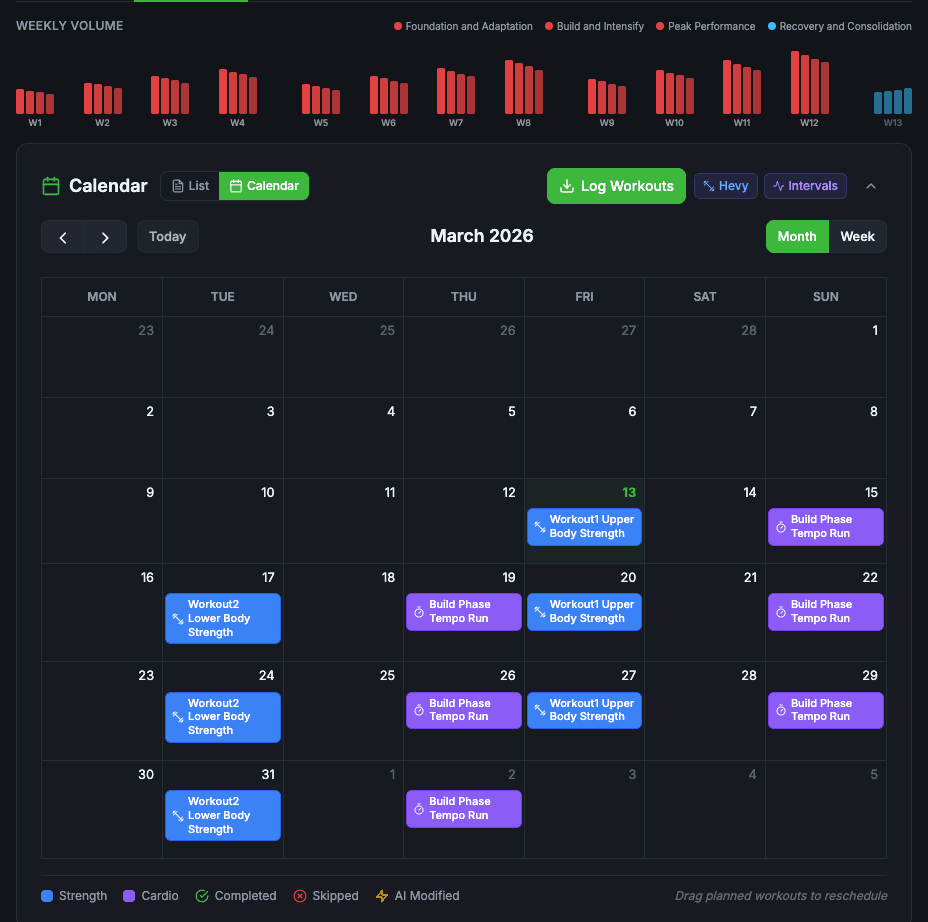
The Calendar tab of an active program shows the whole plan and how it’s going.
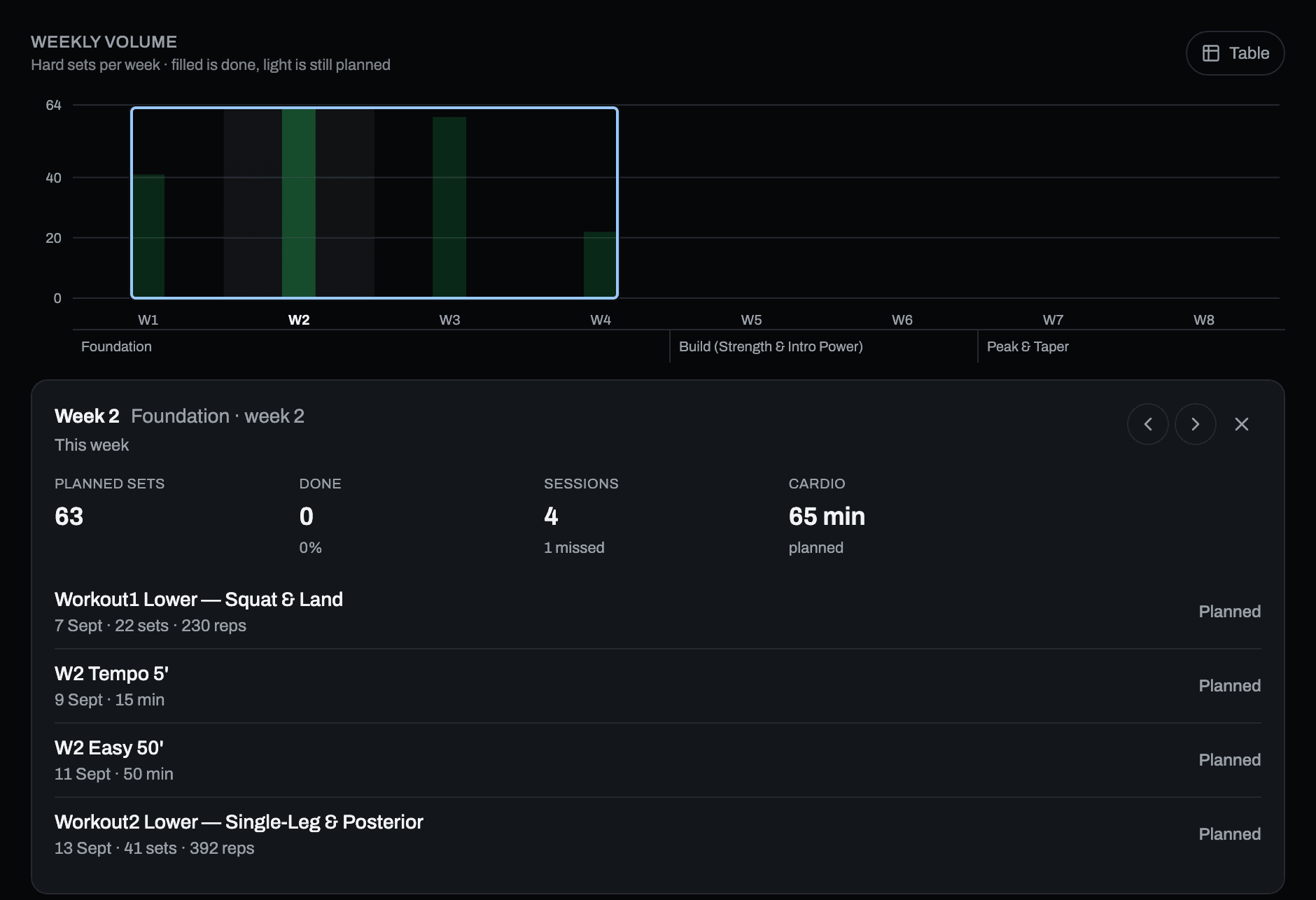
Weekly volume
One bar per week of the program. The height is the number of hard sets that week — warm-up sets are not counted — taken from the progression of every exercise you have planned, not from an estimate.
- Filled is done, light is still planned. A week where you did more than planned shows the excess in a third shade.
- Taller weeks are heavier weeks, and a deload shows as a shorter bar with a dot under its label.
- phase.fitness bands run under the axis, so you see where one block ends and the next begins.
- Tap a week for its sessions: planned sets, how many you completed, what was skipped or missed, and the cardio minutes. Table shows the same numbers as a table.
Weeks of phases not generated yet are empty on purpose: there are no sessions to count until the phase is written.
The calendar
- Tap a session to see what it holds — modality, week and day, duration, exercises with their sets — and Start it if it’s still planned.
- Drag a planned session to another day to reschedule it.
- Skip a session you won’t do. It is marked skipped, and you can reschedule missed sessions later.
- Log Workouts pulls finished sessions from your connected apps and matches them to the plan.
Logging & your apps
A session reaches your calendar in one of three ways.
- The player
- Saved when you finish. Nothing else to do.
- Your own app
- Train in Hevy, Liftosaur, on a Garmin or with Intervals.icu: the session comes back and is matched to the planned one. Garmin sessions arrive as the watch syncs; the others on the nightly sync, or straight away with Log Workouts.
- By hand
- From the list of sessions: effort, fatigue and a note on how it went.
Every logged session shows what you did against the plan — reps done over reps planned, a completion percentage, and Skipped or partial on single exercises.
Sending the program to your apps
Send to apps on the program page sends the routines out, with a preview first. Strength goes to Hevy or Liftosaur and to Garmin as sets and reps on the watch; cardio goes to Garmin and Intervals.icu with its intervals and zones. The first time something goes to Garmin Connect, you are asked to allow it. Calisthenics has nowhere to go — no app out there knows a tuck front lever — so it runs in the player.
An app gets the routine as it was planned, when you send it. Nothing is sent or changed in your apps on its own: send again when you want them updated.
Session analysis
After logging, you can ask the AI to analyse a session: it comments on your numbers — not a retelling of them — and suggests how to adjust the next one.1 credit, charged only when the analysis is saved to your log.
The next phase
Progress, analysis, and what comes after
How a phase moves forward week by week, how it closes, and how the next one is written from it.
Week-to-week progression
Each phase is planned week by week when it is written: how the reps, the load and the effort change, and the deload week at the end. Your routines keep the sets of the first week and never change on their own; the player, Today and the calendar show the numbers of the week you are in, computed from the plan.
- Reps move by the same amount on every set, so a pyramid stays a pyramid; the load moves in proportion, rounded to a weight that exists.
- A deload week shows about 60% of the sets at about 70% of the load. It is the only week with fewer sets, and nothing is deleted.
- Nothing is rewritten or sent to your apps behind your back. An app gets the routine as it was created, when you send it: in Hevy, the numbers of the first week.
- Beat the plan? Add the rep or the plate in the session: the next phase is written from what you logged.
Cardio and calisthenics have their own progressions, written into their plans.
When a phase ends
A phase closes by itself when its weeks are over and you trained at least 80% of its sessions. Closing runs the end-of-phase analysis, which is free.
- Below 80%, or with nothing logged, the phase doesn’t close on its own: an alert asks you what to do, because the choice is yours.
- You can close a phase early with Complete phase — it needs at least one session logged.
- Closed too soon? Reopen phase makes it the current phase again; closing it later runs a fresh analysis.
The analysis lands in the Insights tab: a summary, how ready you are for the next phase, and what it recommends. You can run it again — after fixing a wrongly matched activity, say.
The next phase
From the Phases tab, generate the next phase’s routines. The AI reads the analysis, your notebook and your goal, and writes the phase from what actually happened. It costs 2 credits, charged when its routines are saved.
- It asks for 80% of the previous phase first, and tells you how many sessions are missing. With less, there isn’t much to learn from and the phase comes out generic.
- If you know why — an injury, a trip — the button to skip the previous phase’s results and generate anyway is right there.
- A phase whose previous phase was never generated can’t be generated yet.
Training notebook
Each program has a notebook: the rules the AI reads before writing or changing anything in it.
- Athlete snapshot — your profile when the program was created. Sync Profile refreshes it.
- Set limits and volume targets — sets per exercise type, sets per muscle group per week.
- Duration strategy and exercise selection — how sessions fit your time, which movement patterns and equipment to favour.
- Forbidden exercises — what you excluded.
- Learning history — what each finished phase taught.
Reference
Everything around the plan
Apps, modalities, the Library, your data, and what things cost.
Connected apps
Connect apps in Settings → Integrations. Each card has an on/off switch: turning an app off keeps its key saved, so turning it back on doesn’t mean pasting it again. The full table of what travels where is on Integrations.
- Hevy
- Strength, both ways: routines go out, workouts come back with sets, reps and RPE. Paste the API key from Hevy → Settings → Developer (needs Hevy Pro). History is imported on connect, then nightly.
- Liftosaur
- Strength, both ways: each phase goes out as a ready-to-run program with weights from your maxes, and your logged workouts come back. Needs Liftosaur premium. It is one or the other with Hevy — turning Liftosaur on switches Hevy off, and both keys stay saved.
- Garmin
- Write it here, train it on your Garmin. Strength arrives on the watch as sets and reps; cardio as structured workouts — running, cycling, swimming, rowing, walking and hiking by name, other sports as generic cardio. You are asked before workouts are sent to Garmin Connect. Finished activities come back as the watch syncs and mark the planned session done; the last 30 days are imported on connect. Garmin brings activities only — no sleep, HRV or body battery — and the AI uses them only if you allow it, which you can change any time in Settings → Garmin.
- Intervals.icu
- Cardio both ways, with intervals and zones intact — ready on an Apple Watch too. Brings HRV, resting heart rate and fitness and fatigue (CTL / ATL), and it is how Apple Health data reaches phase.fitness. Needs your Athlete ID and API key from Intervals.icu → Settings → Developer.
- Strava
- Out only, and only what you choose: tick Post to Strava when you save a session in the player, on the web or in the iPhone app, or use the button on the session page, which is also where Apple Watch sessions land. It goes to your feed with your sets in the description. Nothing is imported from Strava — since June 2026 its rules don’t let apps use Strava data in AI — and planned workouts don’t go there: your runs and rides reach the plan from Garmin or Intervals.icu.
Sync Now / Re-sync history
Sync Now pulls what’s new since the last sync. Re-sync history re-imports up to five years and refreshes activities you already have. Intervals.icu has the same pair for wellness.
Source priority
When the same ride or run lands in two apps — Garmin and Intervals.icu, say — phase.fitness merges them into one activity and uses the higher-priority source. The defaults are sensible; change them under Settings → Source Priority.
Cardio
Cardio days are planned for a whole phase at a time, for your sport: running, cycling, swimming, rowing, triathlon and other endurance sports, or conditioning for a team or court sport — which is not just running.
- Placed, not started from zero — when you create the program you say where you are today, and the plan starts there.
- Structured — warm-up, work intervals, recoveries and cool-down, each with a duration and a heart-rate zone.
- Yours to adjust — Edit changes the structure by hand; Refine proposes a change for you to accept.
- On your wrist — sent to Garmin and Intervals.icu with the intervals and zones intact.
Calisthenics
Bodyweight skill work — levers, handstands, muscle-ups — treated as training, with sets, holds and progressions like a squat. Add calisthenics days to any program, or use the Calisthenics section on its own.
- Up to three skills per program, with a short assessment per skill that puts you on the right step of its progression.
- Only your equipment — floor, bar, rings, parallel bars, parallettes, wall, pole.
- In the player — with the hold timer and the progression step on screen. The session counts in your program like any other.
- Free — calisthenics sessions are built from the catalogue, not by the AI, so they cost no credits, regenerating included.
The section also has Goals, Plan your training (pick skills, get a weekly plan), Progressions (skill families from easy to hard), an illustrated Exercise library, and the History of your sessions.
Library
Ready-made programs and sessions, and the ones you save. Anyone can browse the Library; importing and publishing are PRO.
- Import a session into a phase — the calendar updates straight away, and it costs no credits: it comes from the template, not from the AI.
- Save your own — Save as template on a program or a routine; publish it if you want others to train with it.
- Templates are snapshots — editing the original never changes a copy someone else took.
Exercises
The exercise database lets you search and filter the catalogue. Wherever an exercise opens — the player, a program, the Library, your log — it shows a video or image preview, the muscles and equipment, and How to perform. The fundamental lifts have instructions written by hand: setup, movement, and the mistake to avoid.
Wellness & readiness
Recovery data from Intervals.icu: HRV, resting heart rate, sleep and body weight. Garmin brings your activities only, not sleep, body battery or training readiness.
- Readiness on Today — form, fitness and fatigue, from your training load.
- Trends in the Wellness tab of Analytics.
- In the plan — the AI reads your recovery when it writes and adjusts sessions, and the calendar flags high-fatigue days.
Intervals.icu wellness syncs every night and on connect (up to five years back), and on demand with Sync wellness.
Analytics
Five tabs.
- Insights
- Your program’s status, how much of the plan you complete, your fitness curve and training load, and the alerts along the way.
- Wellness
- HRV, sleep and recovery over time.
- Activities
- Everything you did, from every app, in one feed — heart rate, sport breakdown, training stress. Open an activity for its zones, laps and intervals.
- Strength
- Your estimated 1RMs and which way each is moving, sets per muscle group, weekly volume, how hard your sets were, and your personal records.
- Log
- Your sessions, one after the other.
The strength charts are built from the workouts you log in Hevy; cardio detail is richest from Garmin and Intervals.icu.
What the AI knows
Every time the AI writes or changes something, it reads the same layers of context. The more of them are filled in, the less it has to assume.
- Your profile
- Stats, experience, schedule, equipment, injuries.
- Your maxes
- The ones you confirmed — the only numbers loads are calculated from.
- The goal
- The one you confirmed when creating the program, in every session.
- The notebook
- The program’s own rules and exclusions.
- What you did
- Logged sessions, effort, completion, what you skipped.
- Training memory
- Notes the AI extracts from your sessions and feedback, kept across programs. See and manage them in AI Memory.
- AI athlete profile
- A summary of your imported history. The first one needs five sessions; after that it rewrites itself every 30 days once eight new sessions are in. Free.
Your profile
Settings → Profile: basic info, training background, availability and recovery, strength benchmarks, equipment and limitations, units.
- Strength benchmarks — the same maxes as in program creation, in the same place: change one here and the next generation uses it. Save maxes stores them.
- Daily nutrition targets — calories and a protein range, estimated from your age, sex, height, weight, training days and goal: a deficit for fat loss, a small surplus for muscle. It is an estimate — check your weight after two or three weeks and adjust.
Moss
Moss is a tardigrade — pound for pound, the toughest animal we know of. It lives in the quiet corners of the app: empty screens, waiting, errors, the end of a workout. Tap it and it introduces itself.
- A line a day on Today, different for each person — from a hundred written by hand, and new ones every Monday.
- Dress it up in Settings → Moss: five colours, and a wardrobe from a lifting belt to a race bib.
- Not your thing? Keep it out of the way (only errors and empty screens, never during a session), or turn Show Moss off.
Notifications
Choose your emails in Settings → Notifications.
- Alert emails — training alerts, or critical ones only.
- Weekly digest — a training summary every Monday.
- Transactional — import results, a program ready, subscription updates.
The missed-sessions alert waits: never in a program’s first week, only after seven days with sessions planned and none done, and at most once a week.
Print & your data
Print a phase
Print, on a program or a phase, opens an A4 booklet: a cover, then one session per page with empty Reps / kg / RPE columns to fill in with a pen. Fold the stack in half and take it to the gym.
Export your data
Settings → Your data. A zip with JSON and CSV: the whole account, just the plan, or just your training history, with the counts shown before you download. No request, no waiting.
Credits & plans
A credit means the AI did work for you. Free includes 10 credits a month, PRO 100; they renew on your monthly reset date. You are charged when the result is delivered — if a generation fails, your balance doesn’t move.
| What | Credits |
|---|---|
| Create a program — the first phase's routines included | 4 |
| Generate or re-plan a later phase | 2 |
| Refine or regenerate a routine | 1 |
| Analyse a logged session | 1 |
| End-of-phase analysis | Free |
| Adjust workload | Free |
| Week-to-week progression | Free |
| Cardio plans and cardio routine edits | Free |
| Calisthenics sessions | Free |
| Bodyweight and dumbbell versions | Free |
| Library templates | Free |
| AI athlete profile | Free |
PRO is billed every three months ($34.90) or once a year ($104.70 — twelve months for the price of nine). Everything it includes is on Pricing.
Help & feedback
We usually answer within 24 hours.
In the bug hunt? Send feedback in the menu files a bug or an idea straight to us. How the bug hunt works. What changed lately is in the changelog.